
Wavetable
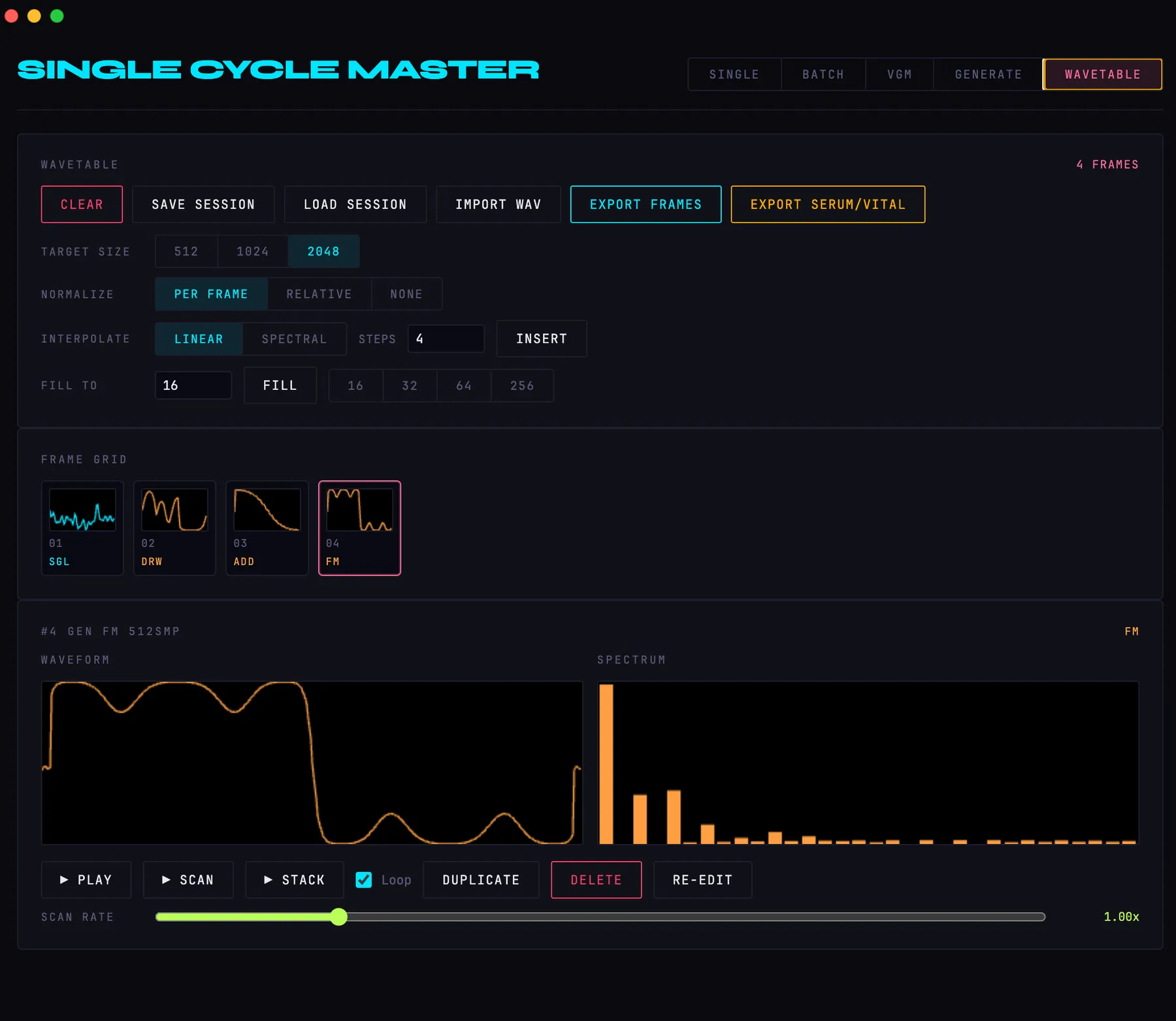
Collect frames from Single, VGM and Generate into a wavetable, then export separate frame WAVs or one Serum/Vital-style WAV.
Build a wavetable
Section titled “Build a wavetable”- In Single, VGM or Generate, extract or make a cycle you like.
- On page 2, click + Wavetable.
- Repeat, from any tab, to collect more frames.
- Open Wavetable to reorder, fill in, listen and export.
Frames from Single and VGM are crossfaded at the seam as they come in. Frames from Generate keep their settings, so Re-edit can open them in Generate again.
Frames
Section titled “Frames”- The frame grid shows one thumbnail per frame. Click one to select it; drag to reorder.
- The detail panel shows the selected frame’s waveform, its spectrum and where it came from.
- Duplicate copies the selected frame; Delete removes it; Re-edit opens a generated frame in Generate.
Listen
Section titled “Listen”| Control | What it does |
|---|---|
| Play | The selected frame |
| Scan | Every frame in order |
| Stack | All frames mixed into one cycle |
| Loop | Repeats what’s playing |
| Scan Rate | Speed of Scan, 0.25×–4× |
Stack is for a rough idea of the blend: a synth’s own interpolation, wavetable position, unison and effects will sound different.
Shape the table
Section titled “Shape the table”- Target Size (512, 1024 or 2048): the frame length for exports and auditions. Use 2048 for Serum and Vital. Changing it doesn’t touch your frames; they’re converted when needed.
- Normalize: Per Frame sets each frame’s peak to full (even loudness while scanning); Relative keeps the differences between frames; None leaves them as they are.
- Interpolate, with Steps: adds in-between frames after the selected one. Linear always works; Spectral works when both frames are additive ones, and otherwise falls back to Linear.
- Fill To (any number, or 16, 32, 64 or 256): fills the table out to that many frames by interpolating between yours. You need at least two frames. It replaces the current table.
Save and export
Section titled “Save and export”- Save Session and Load Session: the whole table, frames and settings, as a file.
- Import WAV: splits a WAV into frames when its length divides into a usual frame size; otherwise brings it in as one frame.
- Export Frames: one WAV per frame.
- Export Serum/Vital: one WAV with every frame in a row. Set Target Size to 2048 first.