The best music player for Mac, depending on how you keep your music
Apple Music, foobar2000, VOX, Swinsian and Konpo compared — which Mac music player suits a streaming library, a tagged collection or a folder full of FLAC.
There is no single best music player for the Mac, because people keep their music in very different ways. Someone who streams everything needs something else than someone with twenty years of carefully tagged MP3s, and both need something else than the person with a drive full of FLAC folders.
So this guide starts with one question — how do you keep your music? — and then looks at five players that are worth your time in 2026. One of them, Konpo, is ours; we’ve tried to be clear about where the others are the better choice.
Prices are as of October 2026.
First: library or folders?
Most Mac players are library apps. You add your files, the app reads their tags into a database, and from then on you browse by artist, album and genre. That works well when your tags are good, and it makes smart playlists and statistics easy.
A folder-based player shows your music the way it sits on disk. Nothing is imported; if you rename a folder, the player shows the new name. That suits people whose folder structure is their organisation, and collections on external drives.
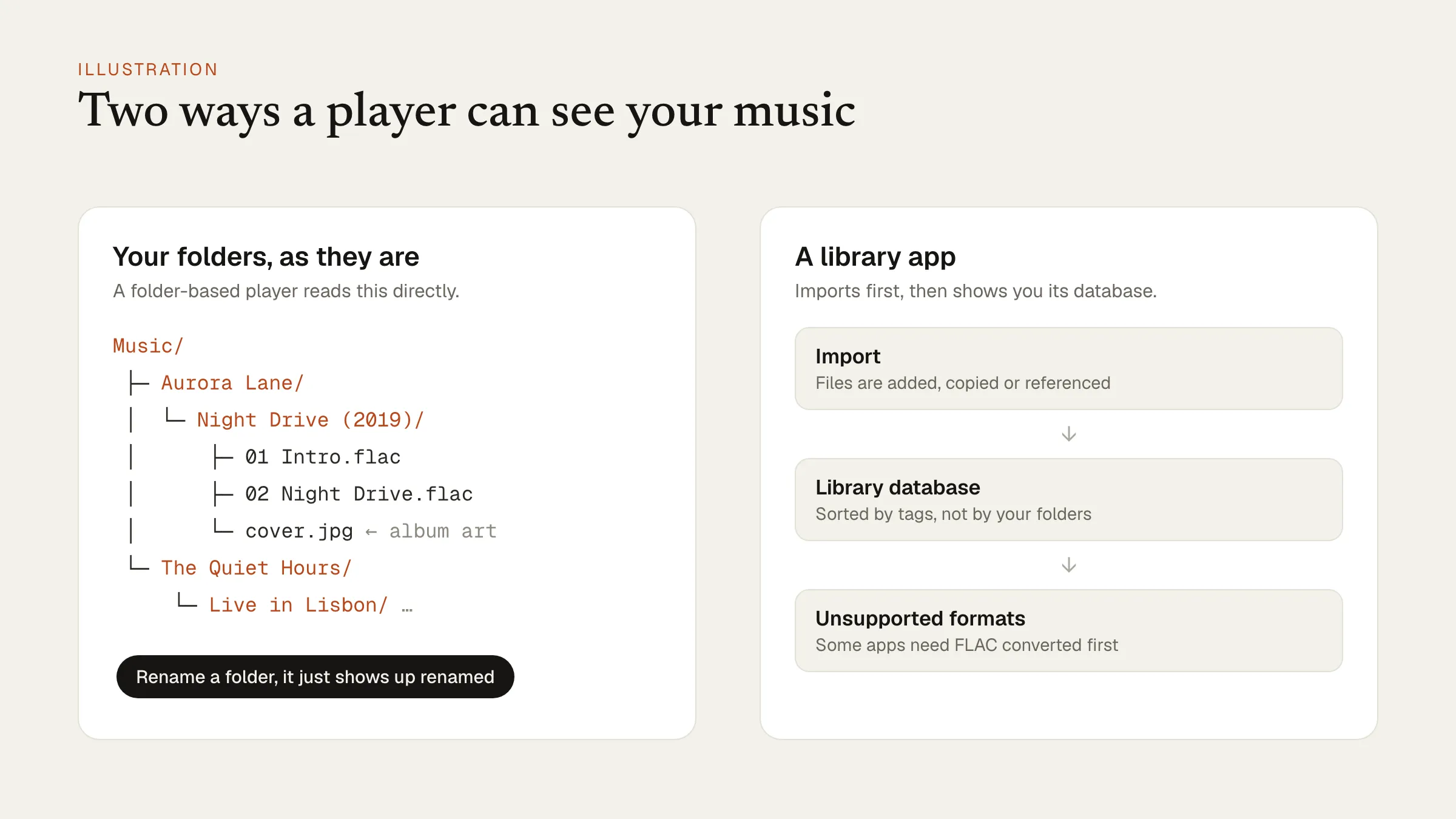 The two approaches. Neither is better; they suit different collections. Illustration.
Apple Music
The Music app comes with every Mac, and if you subscribe to Apple Music it is the obvious choice: your streaming library, your purchases and your own files in one place, synced to your iPhone.
Its weak spot is a large collection of your own files. It doesn’t play FLAC, it insists on importing everything into its library, and it was designed around the streaming service first.
Best for: Apple Music subscribers, and anyone whose collection is mostly AAC or ALAC.
foobar2000
foobar2000 is a legend on Windows, and its Mac version is free and runs natively on Apple silicon. It plays nearly every format, handles huge libraries, and lets you set up its columns and views the way you like.
The Mac version is simpler than the Windows one, and its look is plain. People who loved it on Windows tend to like it here too; people new to it sometimes find it a little bare.
Best for: former Windows users who want a familiar, free, no-nonsense player.
VOX
VOX is a polished free player for the Mac and iPhone with good support for FLAC and high-resolution audio. Its extras — cloud storage for your library and some advanced features — come with VOX Premium, a subscription listed on the App Store at $4.99 a month or $49.99 a year.
Best for: people who want one nice-looking player on the Mac and the iPhone and don’t mind a subscription for the extras.
Swinsian
Swinsian is what many people wish iTunes had stayed: a fast, dense library app with strong tag editing, smart playlists and FLAC support, sold as a one-time licence.
Best for: collectors who care about their tags and want a classic library app without a subscription.
Konpo
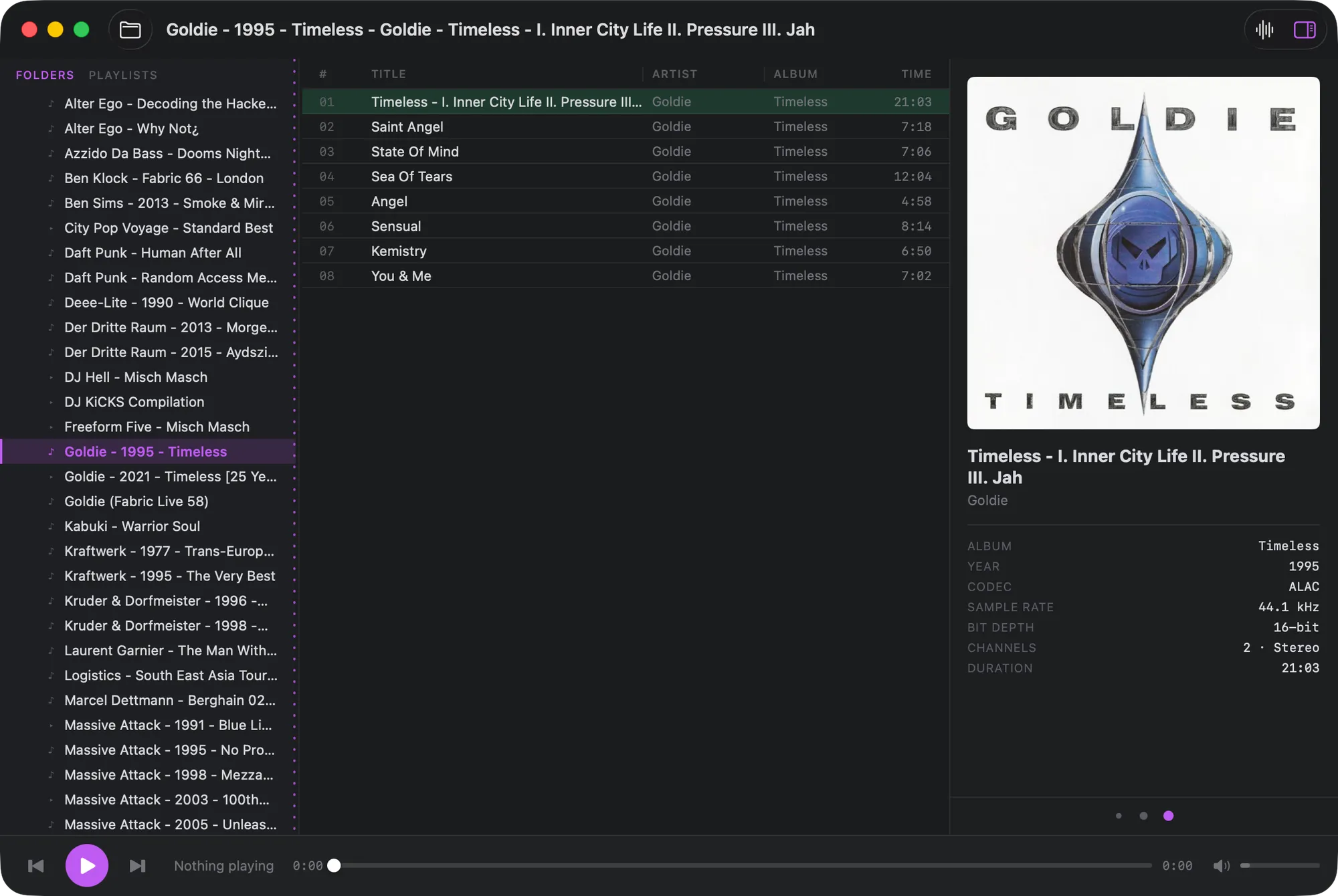
Konpo is our own player, and it is the folder-based option on this list. Point it at your music folder and it plays it as it is, with no import. It handles FLAC, ALAC, MP3, AAC, WAV and AIFF gaplessly, picks up cover.jpg and folder.jpg as album art, and shows sample rate and bit depth for each track. There is an album grid with live search when you’d rather browse by cover.
It is built to be run from the keyboard — Tab, Return, Space and a few ⌘ shortcuts cover everything — and it is free. If you grew up with Winamp, press ⇧⌘V: the MilkDrop visualizer is built in.
Konpo is deliberately small. It doesn’t edit tags, rip CDs, stream or sync to a phone.
Best for: folder collections, especially FLAC, and people who like a quick player they can drive without the mouse.
The short answer
| You keep your music… | Try |
|---|---|
| In Apple Music, streaming | Apple Music |
| In tidy tags, and you want a classic library | Swinsian |
| On Mac and iPhone, with cloud extras | VOX |
| The foobar2000 way, from Windows | foobar2000 |
| In folders, often FLAC | Konpo |
Three of the five are free, so the easiest way to choose is to point two of them at the same albums for a week. For more on playing FLAC on a Mac, see a FLAC player that plays your folders as they are.