darktable vs Lightroom on the Mac, and a third option
darktable is free and powerful, Lightroom is polished and paid monthly. How they compare on a Mac — learning curve, files, speed — and where Chili RAW fits.
If you want to stop paying for Lightroom, darktable is usually the first name you hear. It’s free, it’s open source, it’s been around since 2009, and in the right hands it produces results as good as anything else. It’s also famous for being hard to learn.
This is a practical comparison of darktable and Lightroom for people on a Mac: what each does well, what each costs you, and where a Mac-native editor like Chili RAW — ours — fits between them.
The short version
| Lightroom Classic | darktable | Chili RAW | |
|---|---|---|---|
| Price | Subscription | Free | Free; Pro $39.90 once |
| Runs on | Mac, Windows | Mac, Windows, Linux | Mac (Apple silicon) |
| Learning curve | Gentle | Steep | Gentle |
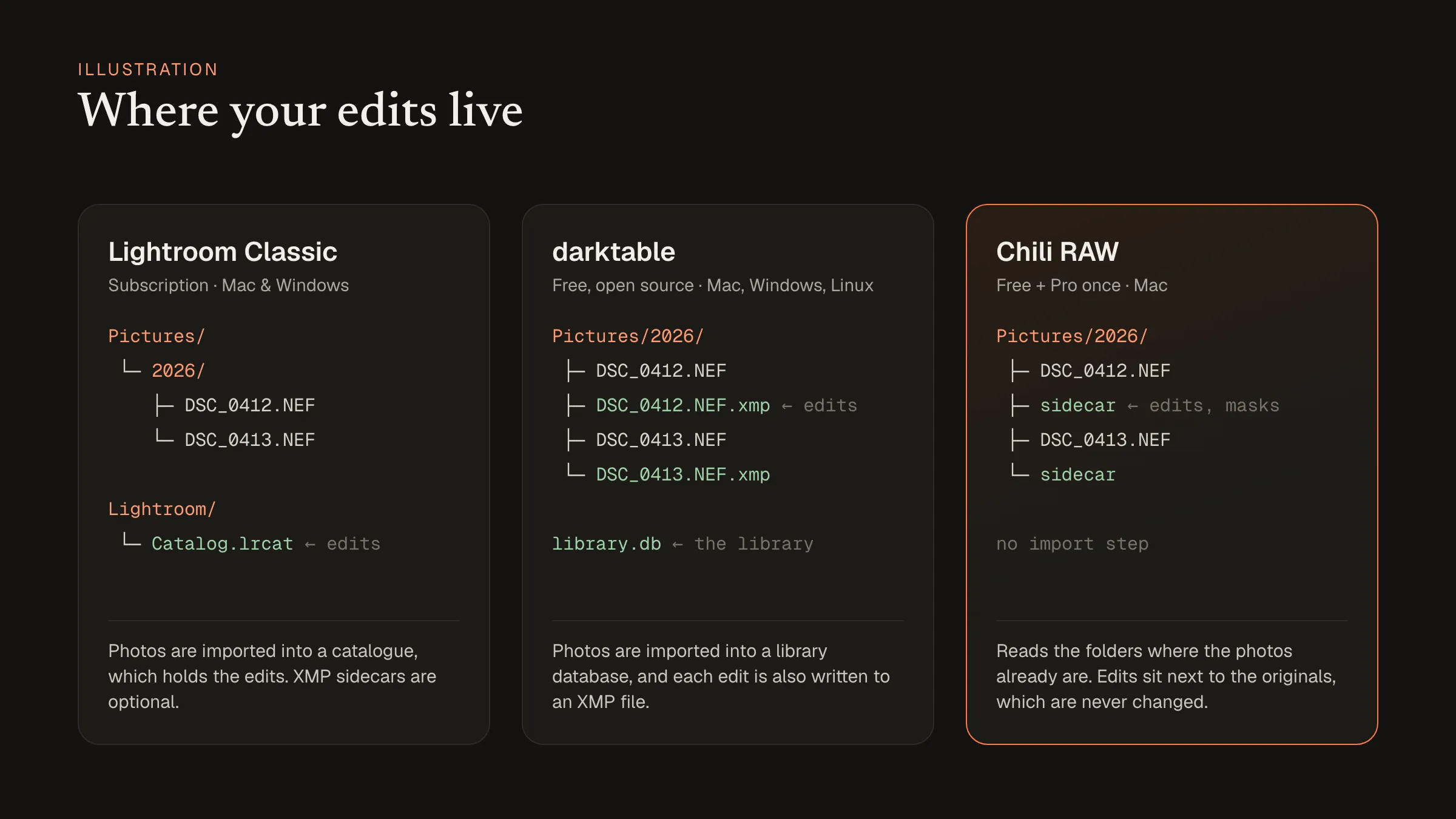
| Your photos | Imported into a catalogue | Imported into a library | Read from their folders |
| Edits stored in | The catalogue | Library and XMP sidecars | Sidecar files |
Lightroom: polished, and paid every month
Lightroom Classic is the standard many photographers learned on. Its strengths are real: a mature library, a huge ecosystem of presets, plugins and tutorials, and tools that just work for most photos. Adobe’s AI masking and removal are excellent.
The catch is the price model. Lightroom is only available as a subscription, so you pay for as long as you want to open your edits in it. Photos are imported into a catalogue that holds every edit; you can also write XMP sidecar files, but the catalogue is the source of truth.
darktable: free, powerful, and its own way of thinking
darktable is free and open source (GPL), and it runs on the Mac, Windows and Linux. The current version at the time of writing, 5.6.1, runs natively on Apple silicon; recent versions need macOS 14 or later on Apple silicon Macs and macOS 15 or later on Intel Macs, with community builds for older systems.
darktable’s editing is built from modules arranged in a processing pipeline, and it works in a scene-referred way: tone mapping comes late in the chain, which gives very natural highlights once you understand it. That understanding is the learning curve. darktable has many modules, several ways to do most things, and terms that differ from Lightroom’s. People who invest a few weekends often love it. People who want to edit a holiday tonight sometimes give up.
Photos are imported into a library database, and darktable also writes an XMP sidecar next to each photo with its edits.
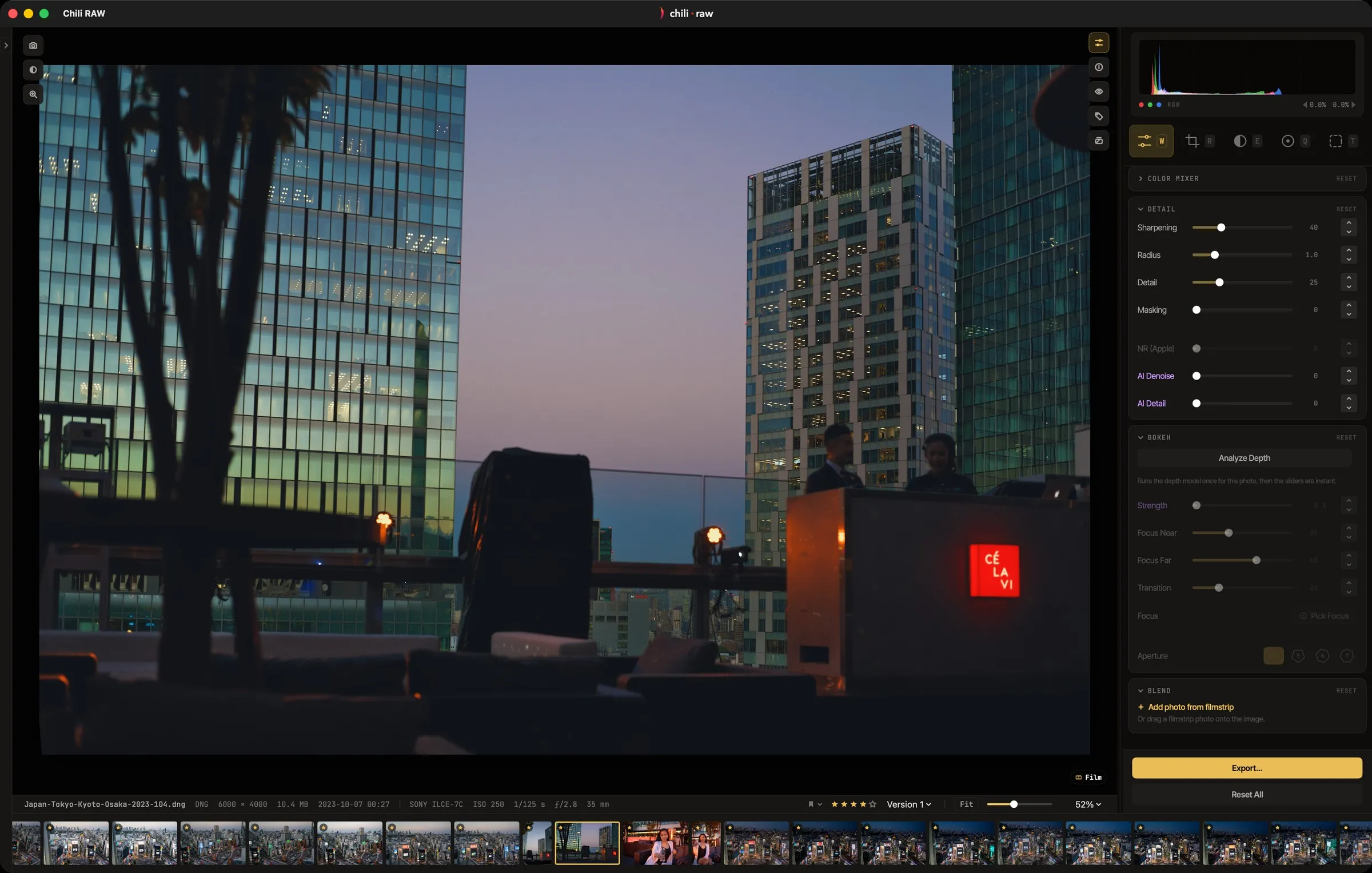 Chili RAW’s develop view. The tools will look familiar if you come from Lightroom.
The third option: a Mac-native editor you pay for once
Chili RAW sits between the two. Like darktable, it doesn’t ask for a subscription: the full editor is free, and the Pro licence is a one-time $39.90. Like Lightroom, its controls are what most photographers expect — white balance, tone, curves, colour, masks — so there’s little to relearn.
It only runs on Macs with Apple silicon, which lets it lean on the Mac’s own frameworks: you can decode a RAW file with Apple’s engine, the Adobe DNG SDK or LibRaw and compare the results. There’s no import. Chili RAW reads your folders as they are, keeps edits in small sidecar files beside the photos, and never changes the originals. The Pro tools — one-click AI masks, generative remove, lens blur and film rendering — run on the Mac, with nothing uploaded.
Which one should you use?
- Choose Lightroom if you rely on its ecosystem of presets and plugins, work across Mac and Windows, or your clients or team use it.
- Choose darktable if you want free and open-source software, use Linux as well as the Mac, and enjoy learning a tool deeply.
- Choose Chili RAW if you work on one Mac, want Lightroom-style tools without the subscription, and would rather your photos stayed in your own folders.
All of them can be tried for free. For a closer look at the third option, see Chili RAW: a free Lightroom alternative for the Mac, and for the newer open-source editors, RapidRAW, LightCraft and Chili RAW compared.