
Rules
Rules choose the format for particular apps and websites. They work in two directions, and both are under Settings → Rules.
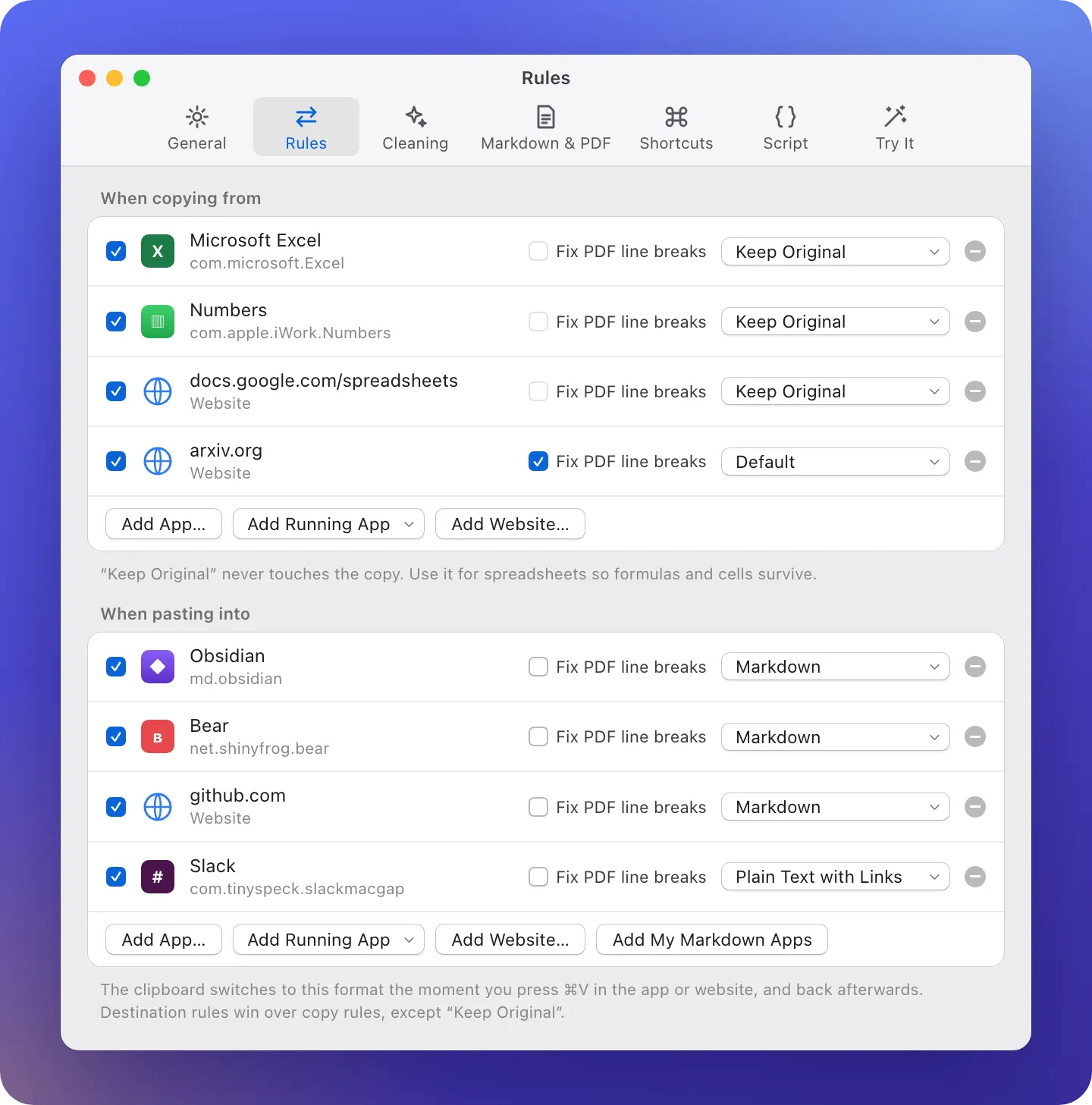
When copying from
Section titled “When copying from”A rule here decides what a copy from that app or website becomes, the moment you copy it. Pastesmith comes with three: Microsoft Excel, Numbers and docs.google.com/spreadsheets are set to Keep Original, so spreadsheet cells and formulas paste correctly.
Keep Original never touches the copy. It’s the right choice for spreadsheets, design apps, or anything whose own formatting matters.
When pasting into
Section titled “When pasting into”A rule here changes the clipboard as you press ⌘V in that app or website, and switches it back afterwards. Copy a web page once, paste it into Obsidian as Markdown and into Slack as text with links, without touching a setting.
Add My Markdown Apps adds a Markdown rule for each of these you have installed: Obsidian, Bear, Typora, iA Writer, Ulysses, MarkText, Zettlr, Logseq, Drafts, Craft, MacDown, CotEditor, Reflect, Capacities, Tana, Anytype and Joplin.
Adding rules
Section titled “Adding rules”Each section has the same buttons:
- Add App… picks one or more apps from Applications.
- Add Running App lists the apps that are open now.
- Add Website… asks for a site, such as
github.comordocs.google.com/spreadsheets.
A new copy rule starts at Keep Original. A new paste rule starts at Markdown for a website or a Markdown app, and Plain Text for other apps. Change it with the menu on the rule’s row.
The menu can also add a rule for the app or site of your last copy, or for the app you’re about to paste into.
Each rule has a checkbox to turn it off for a while, Fix PDF line breaks (see PDF text), its format, and ⊖ to remove it.
A rule’s format can also be Default. A copy rule set to Default keeps your default format and only adds the PDF fix. A paste rule set to Default keeps whatever the copy was going to paste as.
Websites
Section titled “Websites”A website rule matches the site and all its subdomains: google.com also covers docs.google.com. Add a path to narrow it down: docs.google.com/spreadsheets only matches spreadsheets. www. and https:// are ignored.
When you copy, Safari and Chrome-based browsers usually say which page the text came from. If they don’t, or when you paste into a browser, Pastesmith asks the browser for the address of the current tab. Each browser asks you once to allow this (macOS calls it Automation).
Which rule wins
Section titled “Which rule wins”- A website rule beats an app rule, because it’s more specific. Among websites, the longest match wins.
- A paste rule beats a copy rule, except Keep Original: a copy kept original stays original wherever you paste it.
- With no rule, your default format applies.
Try It shows which rule decides a paste, for any app or site you pick.
Accessibility
Section titled “Accessibility”Paste rules need Accessibility access, so Pastesmith can see ⌘V before the app does. Without it, the Rules tab shows a warning with a Grant Access… button, and paste rules are skipped. Copy rules need no permission.