
The menu
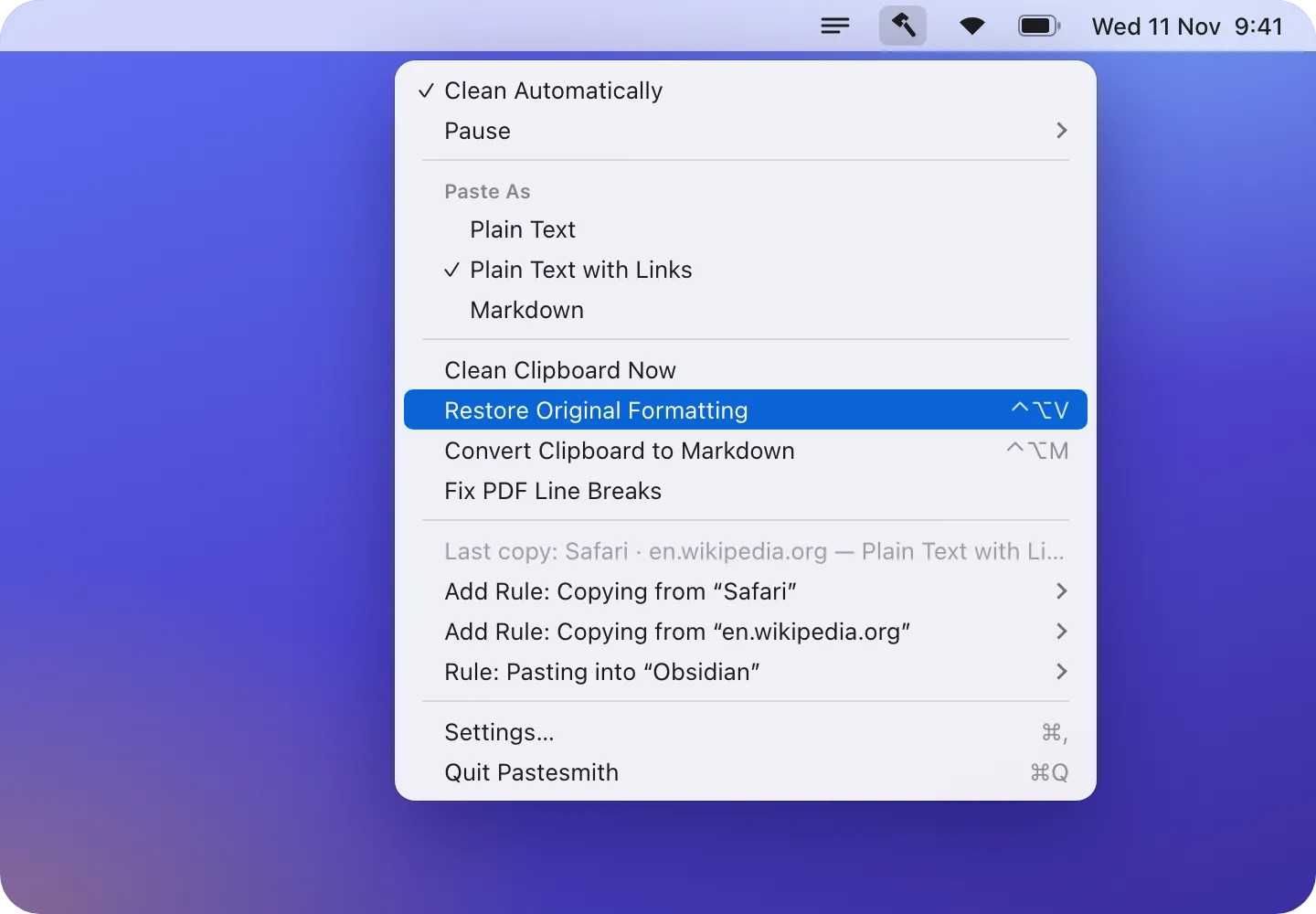
Click the hammer in the menu bar to open Pastesmith’s menu. Right-click it (or Control-click) to turn automatic cleaning on or off without opening the menu.
Cleaning on, off or paused
Section titled “Cleaning on, off or paused”- Clean Automatically cleans every copy as it happens. Turn it off and Pastesmith leaves the clipboard alone until you ask, from the menu or with a shortcut.
- Pause, shown while cleaning is on, stops cleaning For 5 Minutes, For 15 Minutes or For 1 Hour. While paused the menu shows Resume (Paused Until …).
The hammer is dimmed while cleaning is off or paused.
Paste As
Section titled “Paste As”The three formats you can use as the default: Plain Text, Plain Text with Links and Markdown. The ticked one is used for every copy that no rule decides. Changing it also updates the copy on the clipboard now, unless a rule decided that one. See Formats.
Clipboard actions
Section titled “Clipboard actions”These work on whatever is on the clipboard now, whether or not automatic cleaning is on.
| Item | What it does |
|---|---|
| Clean Clipboard Now | Cleans the clipboard in your default format. Useful when automatic cleaning is off or paused. |
| Restore Original Formatting | Puts the copy back exactly as it was copied, formatting and all. Rules won’t change it again when you paste. |
| Convert Clipboard to Markdown | Turns the copy into Markdown, whatever your default. |
| Fix PDF Line Breaks | Runs the PDF fix on the copy, keeping its format. |
If you set a shortcut for an action, it shows next to the item. Restore Original Formatting shows ⌃⌥V and Convert Clipboard to Markdown shows ⌃⌥M by default; those shortcuts paste right away instead (see Keeping the original).
The last copy
Section titled “The last copy”The greyed line Last copy: tells you where your last copy came from (the app, and the website when there is one) and what Pastesmith did with it: Markdown, Plain Text · PDF fixed, kept original (rule), already plain and so on.
Below it are submenus to add or change a rule in one step:
- Add Rule: Copying from “app”, for the app you copied from.
- Add Rule: Copying from “website”, when the copy came from a web page.
- Add Rule: Pasting into “app”, for the app that was in front when you opened the menu.
Each submenu lists the formats, Fix PDF Line Breaks, and Remove Rule once the rule exists. When a rule already exists the item reads Rule: instead of Add Rule:. See Rules.
Settings and Quit
Section titled “Settings and Quit”Settings… (⌘,) opens the settings window. Quit Pastesmith (⌘Q) quits; the clipboard stays as it is.
During the trial the menu starts with Trial: N days left — Buy or Enter License…. See Trial and licence.