Little Snitch alternatives for Mac: LuLu, Radio Silence and MacBulwark
Looking for a Little Snitch alternative? How LuLu, Radio Silence and MacBulwark compare with Little Snitch on price, rules, alerts and how long setup takes.
The best-known Little Snitch alternatives for the Mac are LuLu, which is free and open source, Radio Silence, a $9 app that blocks whole apps without pop-ups, and MacBulwark, a $6.90 firewall that blocks per app or per domain and labels what each domain is for. Little Snitch itself is still the most complete of them. If you need everything it does, the honest advice is to buy it.
Most people don’t need everything it does, though. They want to see what their apps send out, stop the telemetry and keep the apps working. Here is how the four compare, as of November 2026. MacBulwark is our app, so we have tried to be specific about where the others are the better choice.
The short version
| Little Snitch | LuLu | Radio Silence | MacBulwark | |
|---|---|---|---|---|
| Price | $59 / €59 once (single licence) | Free | $9 once | $6.90 once |
| Licence | One user, family and multi licences | Open source (GPL-3.0) | All your own Macs | Two of your own Macs |
| Trial | Demo mode, 3 hours at a time | – | 24 hours | 7 days |
| New connections | Asks you (or Silent Mode) | Asks you (or passive mode) | Silent | Silent |
| Block a whole app | Yes | Yes | Yes | Yes |
| Block single domains | Yes, plus ports and protocols | Yes, also by regex | No | Yes |
| Says what a domain is for | Where the developer explains it | No | No | Yes, a label on every domain |
| Network map and long history | Yes, up to 12 months | Netiquette monitor | Live monitor | Last 5 minutes |
| Profiles, blocklists | Yes | Yes | No | No |
| macOS | 14 or later (version 6) | 10.15 or later | 10.15 or later | 14 or later |
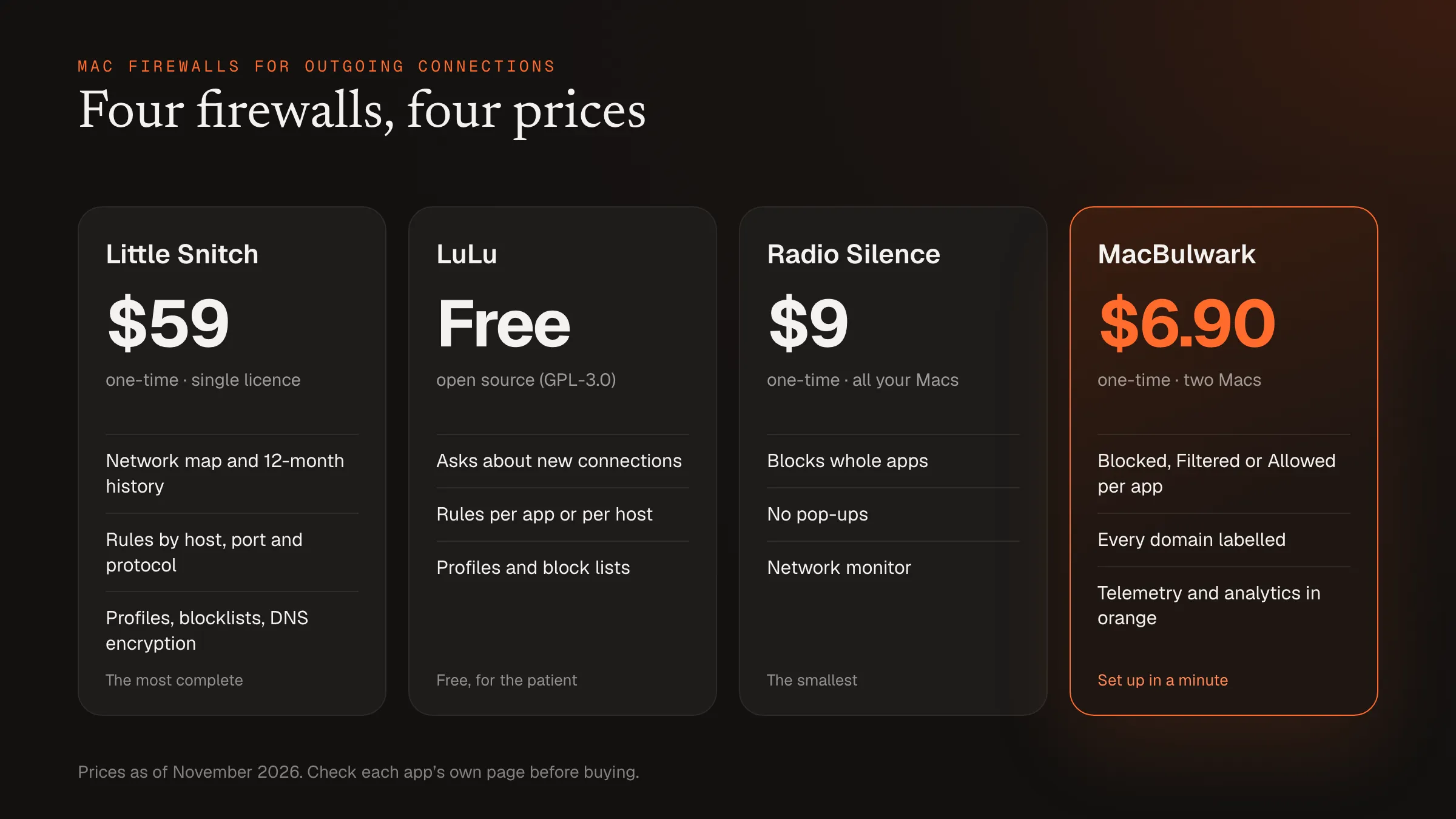 Prices as of November 2026. All four are one-time purchases or free.
Little Snitch: the one to beat
Little Snitch is the oldest name here, and it shows. The current version, 6.5, came out in September 2026, and Little Snitch 7 is in beta. It does far more than any app on this list:
- Connection alerts. When an app tries to reach a new server, Little Snitch asks whether to allow or deny it, once or for good. Silent Mode lets everything through and leaves the decisions for later.
- The Network Monitor. A live map of where your connections go, with data volumes, ports and protocols, and up to twelve months of history.
- Detailed rules by server, domain, port and protocol, grouped and switched on and off together.
- Profiles that change automatically, for example on a different Wi-Fi network.
- Blocklists you can subscribe to, DNS encryption, a command-line tool and rules tied to an app’s code signature.
A single licence is $59 (59 € in Europe). Without a licence it runs in demo mode with full protection for three hours at a time, and the Network Monitor works for 30 days. There is also Little Snitch Mini on the Mac App Store: the free version is a viewer with five minutes of history, and blocking needs the paid subscription.
Buy Little Snitch if you want to see where every byte goes, write rules down to the port, or switch profiles between networks. Nothing else here comes close.
LuLu: free and open source
LuLu is made by Patrick Wardle’s Objective-See and is free, with its source code on GitHub under the GPL. The current version is 4.5.
It works like Little Snitch’s alert mode: when an app makes a new outgoing connection, LuLu asks you to allow or block it. Rules can cover a whole app or a single host, even with regular expressions. Version 4 added profiles, and there are block lists, a passive mode that only applies your existing rules, and a block mode that stops everything.
The price of free is attention. A fresh install asks a lot of questions in its first days, and each one is an app name and a server address, so you have to judge what that address is for. That’s fine if you like that kind of thing. If you’d rather not decide on every connection, it gets tiring.
Choose LuLu if you want a free, open-source firewall, don’t mind the alerts while it learns, and know roughly what a server name means.
Radio Silence: small and quiet
Radio Silence, by Juuso Salonen, goes the other way: no alerts at all. You put apps on a list, and those apps can’t reach the internet. A network monitor shows which apps and processes are connecting right now, and you can block one from there with a click. Blocking an app also blocks the processes it starts.
It costs $9 once, runs on macOS 10.15 or later, and one licence covers all your own Macs. Its older versions go back to Snow Leopard, and the idea has barely changed since, which is a compliment.
What it doesn’t do is go below the app. As far as its own site and FAQ describe it, a rule is “this app may not go online”, so you can’t keep an app working and cut only its analytics. We compare the two in detail in Radio Silence vs MacBulwark.
Choose Radio Silence if you mostly want to take whole apps offline, on several Macs or an older macOS.
MacBulwark: simple, with domains explained
MacBulwark is our firewall for what leaves your Mac. It sits between Radio Silence and Little Snitch: more control than switching apps off, without a wall of settings.
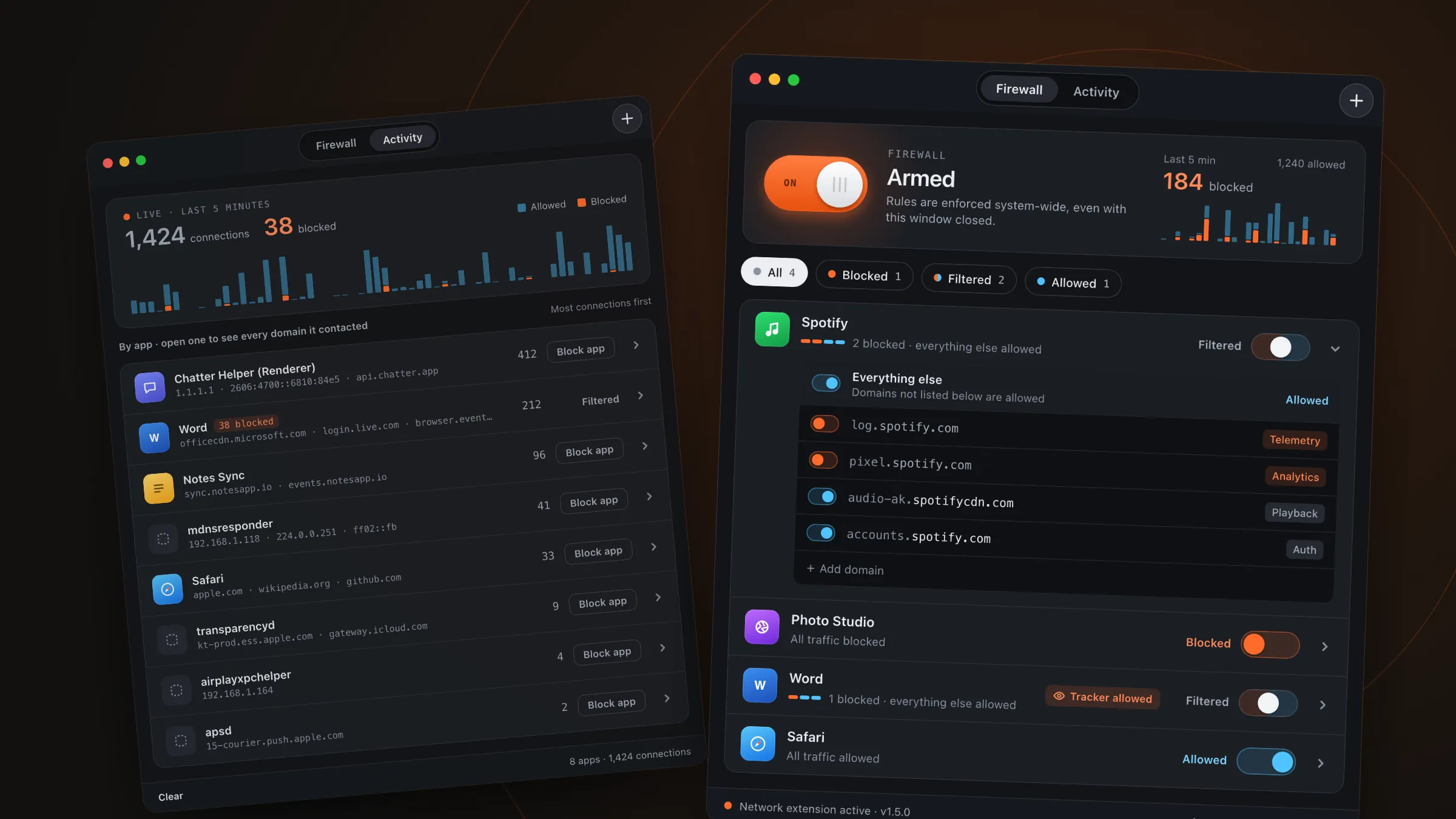
- One switch per app with three positions: Blocked, Filtered or Allowed. Filtered means some domains are allowed and some blocked.
- Every domain has a label: Telemetry, Analytics, CDN, Auth, Sync, Account, Playback, Metadata, Update or AI. Telemetry and Analytics are orange, so the trackers stand out without your having to know the domain.
- Tracker allowed appears next to any app that can still reach a telemetry or analytics domain.
- Allow-lists and block-lists: decide what happens to everything else, then list the exceptions.
- The Activity tab lists every app and process that went online in the last five minutes, with the domains it reached. Block the app, or block or allow a single domain, straight from there.
- Rules keep working with the window closed and after a restart, because a macOS network extension enforces them.
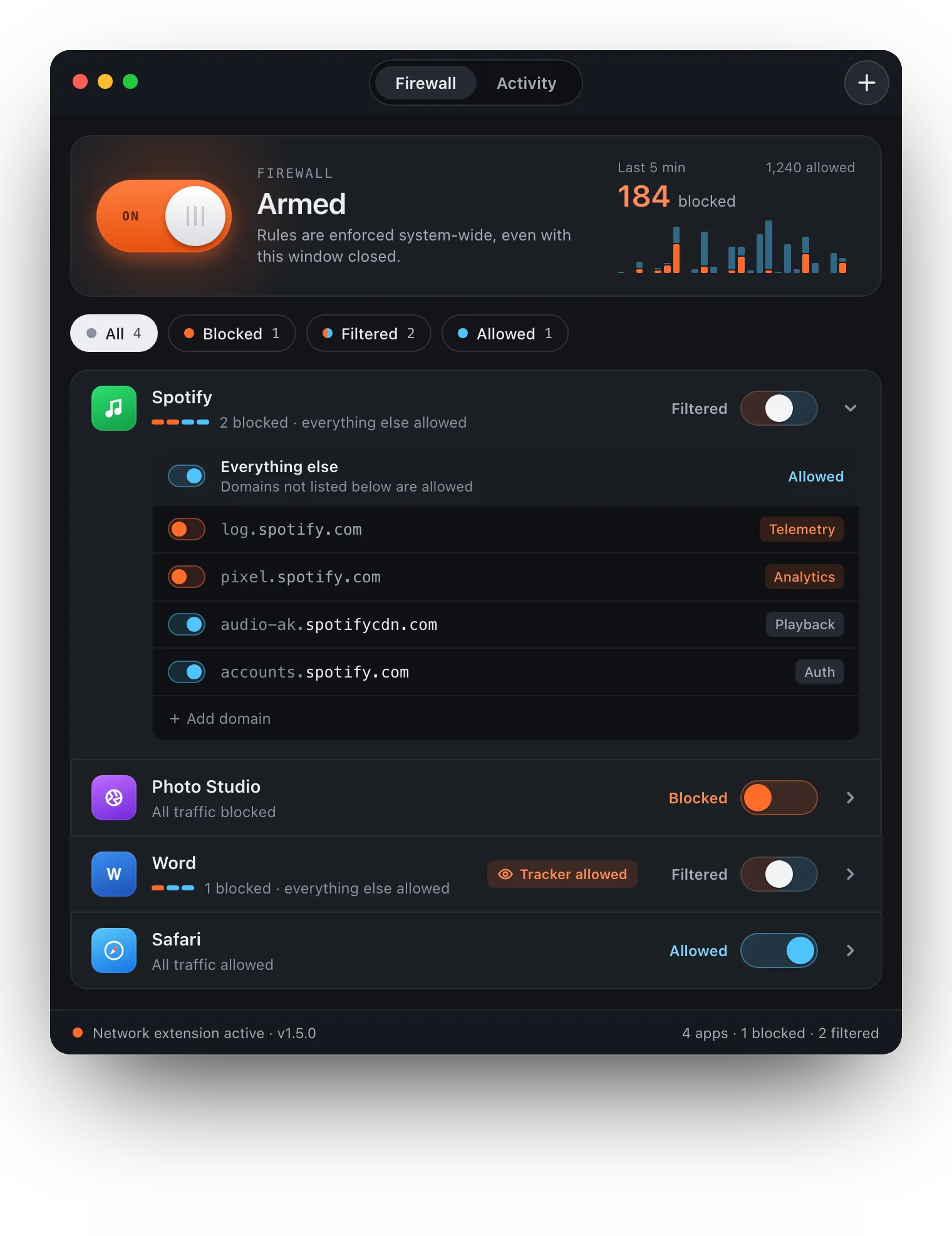 Spotify keeps playing; its telemetry and analytics domains don’t get through.
Setting it up takes about a minute: turn on the firewall, approve the extension in System Settings, then add an app with +. The manual covers the rest.
What it doesn’t do: it doesn’t ask you about new connections. An app you haven’t added is not filtered, so you find new talkers in Activity rather than in a pop-up. It has no network map or long history (Activity covers the last five minutes), no profiles or subscribed blocklists, and it needs macOS 14. Domain rules need a server name, so a connection an app makes straight to an IP address follows the app’s everything else setting instead.
It’s $6.90 once for two of your own Macs, with a free 7-day trial, and it updates itself.
Choose MacBulwark if you want to see which apps phone home, understand what each domain is for, and block the trackers without breaking the app, without learning a firewall first.
Others
Vallum, from the makers of the Murus firewall front-end, still exists for people who want low-level control; it’s aimed at experts. The firewall built into macOS (System Settings ▸ Network ▸ Firewall) is no alternative here: it only blocks incoming connections, not what your apps send out.
Which one should you get?
- You want everything and don’t mind paying for it: Little Snitch.
- You want free and open source and don’t mind questions: LuLu.
- You want whole apps offline, quietly, on every Mac you own: Radio Silence.
- You want to keep your apps and drop their telemetry, and see in plain words what each domain is for: MacBulwark.
If you’re not sure what your apps are sending in the first place, start there: how to see which apps on your Mac connect to the internet shows the built-in ways first. And if you like paying once for small Mac tools, see Mac apps without a subscription.