A PDF Expert alternative without a subscription
PDF Expert costs $79.99 a year, or $139.99 once for the Mac. The cheaper and free options compared: Preview, PDFgear, Acrobat Reader and PDFBoy at $9.99 once.
PDF Expert’s Premium plan costs $79.99 a year and covers the Mac, iPhone and iPad; the only way to avoid the subscription is a Mac-only lifetime licence for $139.99. If you mostly fill forms, sign, mark up, redact, shrink and combine PDFs, you can do that for free with Preview or PDFgear, or for $9.99 once with PDFBoy, our Mac app. If you edit the body text of PDFs, or need your PDFs on an iPad, PDF Expert is still the better tool.
Here is what each option costs and does, as of November 2026. PDFBoy is ours, so we’ve tried to be plain about where the others are ahead.
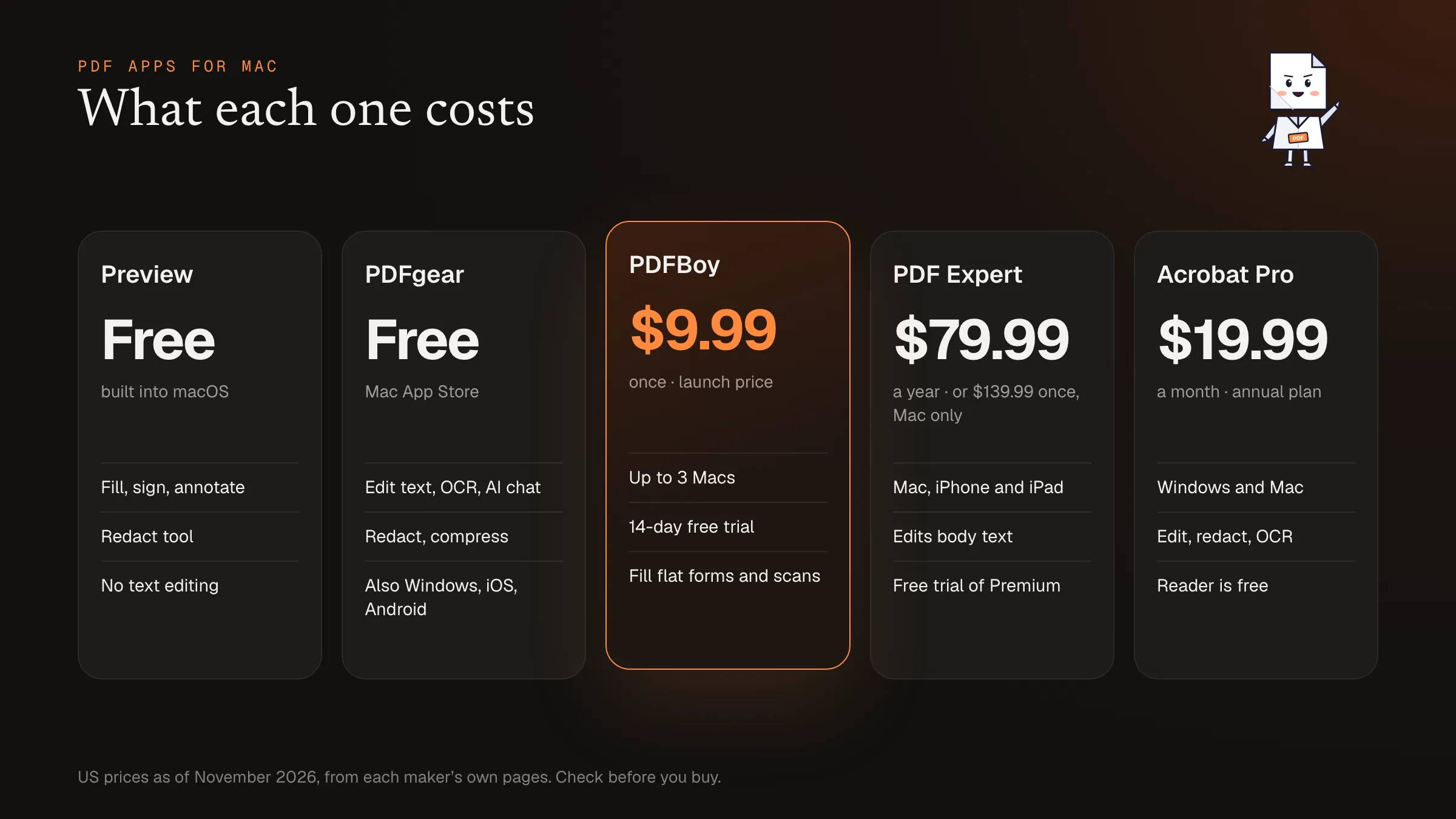 US prices from each maker’s own pages, November 2026.
What PDF Expert costs now
PDF Expert by Readdle is one of the best PDF editors on the Mac, and it is free to download. The free version opens and reads PDFs; the tools most people buy it for are part of Premium:
- Yearly: $79.99, one plan for Mac, iPhone and iPad.
- Lifetime: $139.99, a one-time purchase for the Mac only. The iPhone and iPad apps still need the subscription.
Readdle moved to this model with PDF Expert 3 in 2022 and let earlier Mac buyers keep the features they had paid for. Newer additions, such as OCR and converting PDFs to Word, are Premium. The current Mac version needs macOS 12 Monterey or later.
What you get for the money is a lot: editing the existing text, images and links in a PDF, OCR for scans, converting to Office formats, redaction, forms, signatures, and the same library on all your Apple devices.
The free and one-time alternatives
Preview (free, already on your Mac)
Preview does more than people expect. It fills real form fields and, with its Form Filling toolbar, tries to detect fields on flat forms and scans. It signs (trackpad, camera or iPhone), annotates, has a Redact tool, combines PDFs by dragging page thumbnails between windows, and can shrink a file with the Reduce File Size filter when you export.
What it can’t do is edit the text that’s already in a PDF, and its form filling falls back to dragging text boxes into place when detection misses, which on a flat form it often does.
PDFgear (free)
PDFgear is a free PDF editor for Mac, Windows, iPhone and Android, available on the Mac App Store, with no account needed and no watermark on saved files. Its feature list is long for a free app: editing text and images, OCR, conversion, redaction, compression, merging and an AI chat assistant. If you want “PDF Expert, but free” and don’t mind a cross-platform app, try it first.
Adobe Acrobat Reader (free, with limits)
Reader is free for reading, commenting, filling and signing, and its Fill & Sign tool tries to detect fields on flat forms, with mixed results. Editing text, redaction, combining and compressing need a paid Acrobat plan, and those are subscriptions: Acrobat Standard from about $14.99 a month and Acrobat Pro, the plan that includes redaction, about $19.99 a month, both on an annual plan in the US. If you work in Acrobat at your job, it’s the reference tool; for occasional PDFs at home, it’s the most expensive option here.
PDFBoy ($9.99 once)
PDFBoy is a small Mac app (about 9.5 MB) built around the PDF jobs most people actually have: filling forms, signing them and sending them back.
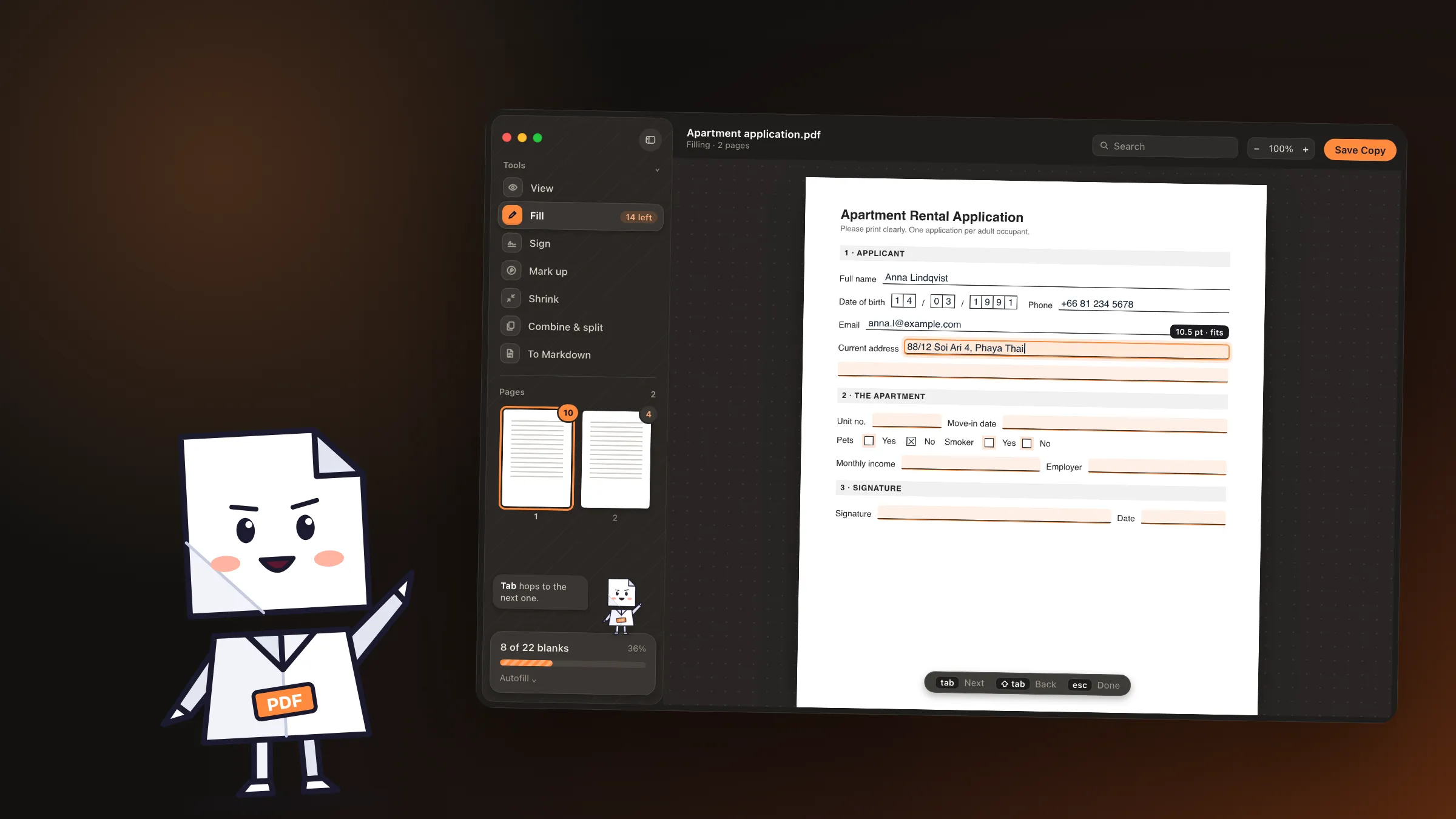
- Fills any form, even with no form fields. It finds the lines, boxes, comb boxes, checkboxes and table cells on the page, scans included. Click near a blank and type; Tab moves to the next one in reading order; the text is sized to the label next to it. See how to fill a PDF form that isn’t fillable.
- Smart fill offers your saved details for the blanks it recognises, for you, a partner or your company, and waits for your OK.
- Sign with a signature drawn on the trackpad, sketched on your iPhone or iPad, or photographed on paper, placed at its real size, with company stamps beside it.
- Mark up: ink, shapes, highlights, notes, callouts and stamps, each listed in Your marks.
- Whiteout covers a word in the paper’s colour and lets you retype it in the same font and size. Redact removes the covered words from the file for real, and keeps the rest of the page searchable.
- Shrink with three settings that show the size before you save, combine and split, and turn a PDF into Markdown, scans included.
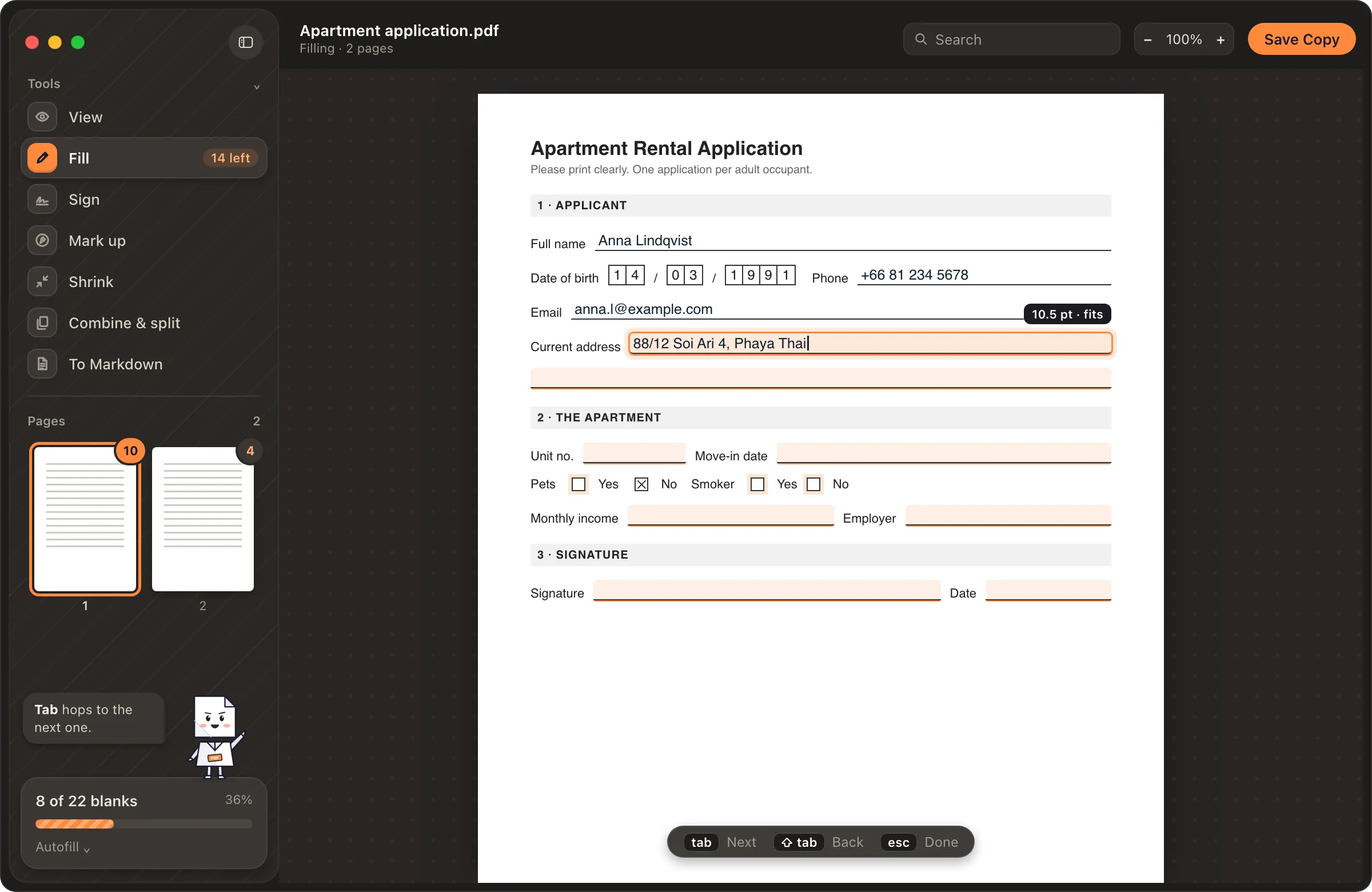 PDFBoy in Fill: every blank on the form is a place to type.
The launch price is $9.99 once, with a 14-day free trial of every tool, and one licence covers up to 3 of your Macs. Updates are included. It needs macOS 14 Sonoma or later, on Apple silicon or Intel, and everything happens on your Mac, text recognition included.
Feature by feature
| Preview | PDFgear | Acrobat Reader | PDF Expert | PDFBoy | |
|---|---|---|---|---|---|
| Price | Free | Free | Free; paid plans by subscription | $79.99/year, or $139.99 once (Mac) | $9.99 once |
| Platforms | Mac | Mac, Windows, iOS, Android | All | Mac, iPhone, iPad | Mac |
| Fill real form fields | Yes | Yes | Yes | Yes | Yes |
| Flat forms and scans | Form Filling detection, or text boxes | Text tool | Fill & Sign detection, or text | Text tool | Finds the blanks, sizes the text to the form |
| Sign | Yes | Yes | Yes | Yes | Yes, at real size, with stamps |
| Edit existing body text | No | Yes | Paid plan | Yes | No (Whiteout and retype) |
| Redact | Yes | Yes | Acrobat Pro | Yes | Yes, page stays searchable |
| OCR a whole scan | No | Yes | Paid plan | Premium | No (only on redacted pages and for Markdown) |
| Shrink, combine, split | Yes | Yes | Paid plan | Yes | Yes |
Where PDF Expert is better
Be clear about what you’d give up:
- Editing the text in a PDF. PDF Expert, PDFgear and paid Acrobat can change a paragraph, swap a font or move an image. PDFBoy can’t; its Whiteout covers a word and lets you type over it, which is fine for a wrong date or a typo, not for rewriting a page.
- iPhone and iPad. PDF Expert syncs your work across Apple devices. PDFBoy is a Mac app only.
- OCR and conversion. If you need to make a whole scanned book searchable, or turn PDFs into Word documents, PDF Expert Premium, PDFgear or Acrobat do that. PDFBoy doesn’t.
Who PDFBoy suits
PDFBoy is for people whose PDF work is mostly: a form from the landlord, the tax office or a school; a contract to sign; a document to mark up, redact before sending, shrink for email or put together from three files. For that, it’s faster than PDF Expert at the part that takes the longest, filling flat forms, and it costs less than two months of PDF Expert’s subscription, once.
If you also edit PDFs’ text every week, PDF Expert’s lifetime licence or PDFgear make more sense. If you can’t decide, try them side by side: PDFBoy’s trial is 14 days with no limits, and PDFgear and Preview cost nothing. The PDFBoy manual shows every tool.
PDFBoy is one of our Mac apps without a subscription: each is free or a one-time purchase.