Radio Silence vs MacBulwark: two quiet Mac firewalls compared
Radio Silence blocks whole apps; MacBulwark can also block single domains and labels what each is for. Price, licence, trial and what each one does better.
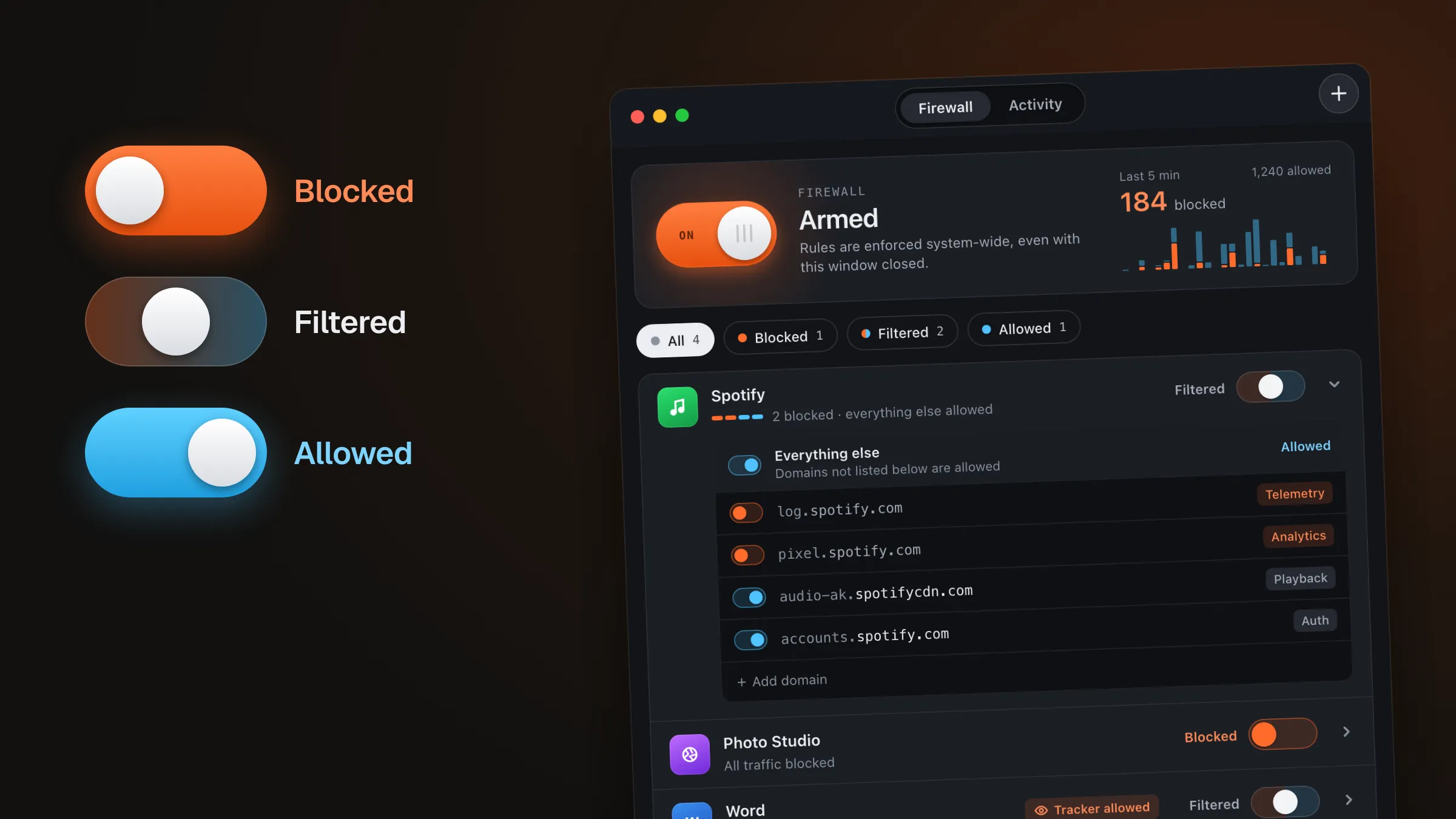
Radio Silence and MacBulwark are both quiet firewalls for outgoing connections on the Mac: no pop-ups, you make a list and they enforce it. The main difference is how fine the list is. Radio Silence blocks whole apps. MacBulwark can do that too, but it can also block single domains inside an app and labels each one with what it’s for, so you can keep an app working and cut only its telemetry.
Radio Silence is cheaper per Mac, runs on older macOS and has years behind it. MacBulwark is our app, and below we say plainly where each one is the better buy. Facts are as of November 2026.
At a glance
| Radio Silence | MacBulwark | |
|---|---|---|
| Price | $9 once | $6.90 once |
| Licence | All your own Macs | Two of your own Macs |
| Trial | 24 hours, plus a 30-day refund | 7 days, every feature |
| macOS | 10.15 or later | 14 Sonoma or later |
| Apple silicon and Intel | Yes | Yes |
| Pop-ups for new connections | No | No |
| Block a whole app | Yes, including the processes it starts | Yes, helpers follow their app |
| Block single domains of an app | No | Yes |
| Allow only some domains (allow-list) | No | Yes |
| Labels for what a domain does | No | Telemetry, Analytics, CDN, Auth and six more |
| Shows connections | Live network monitor | Activity: last 5 minutes, per app, with domains |
| Works with the window closed | Yes | Yes |
The Radio Silence column comes from its own website and FAQ (version 3.4 at the time of writing). We found no per-domain or per-host rule there; if that changes, we’ll update this page.
Where Radio Silence is good
It’s small and it stays out of the way. Radio Silence adds nothing to the menu bar and keeps no window open. You add the apps that shouldn’t go online, and that’s it. For a lot of people that is the whole job: an old app that shouldn’t phone home, a game, a utility that has no business on the internet.
One licence, all your Macs. At $9 for every Mac you own, a household with three Macs pays less than with MacBulwark, whose licence covers two.
It runs on older systems. macOS 10.15 Catalina or later, against MacBulwark’s macOS 14 Sonoma. On an older Mac, Radio Silence is the one that installs.
It has a long track record. Older versions go back to Snow Leopard. Software that has done one thing for that long, without growing into something else, has earned some trust.
If you only ever want an app fully online or fully offline, Radio Silence does that well and you don’t need anything more.
Where MacBulwark does more
The trouble with blocking a whole app is that most apps you’d want to quiet are apps you also use. A music app needs its streaming servers. A word processor needs its sign-in and its updates. Blocking the app stops the telemetry, and everything else with it.
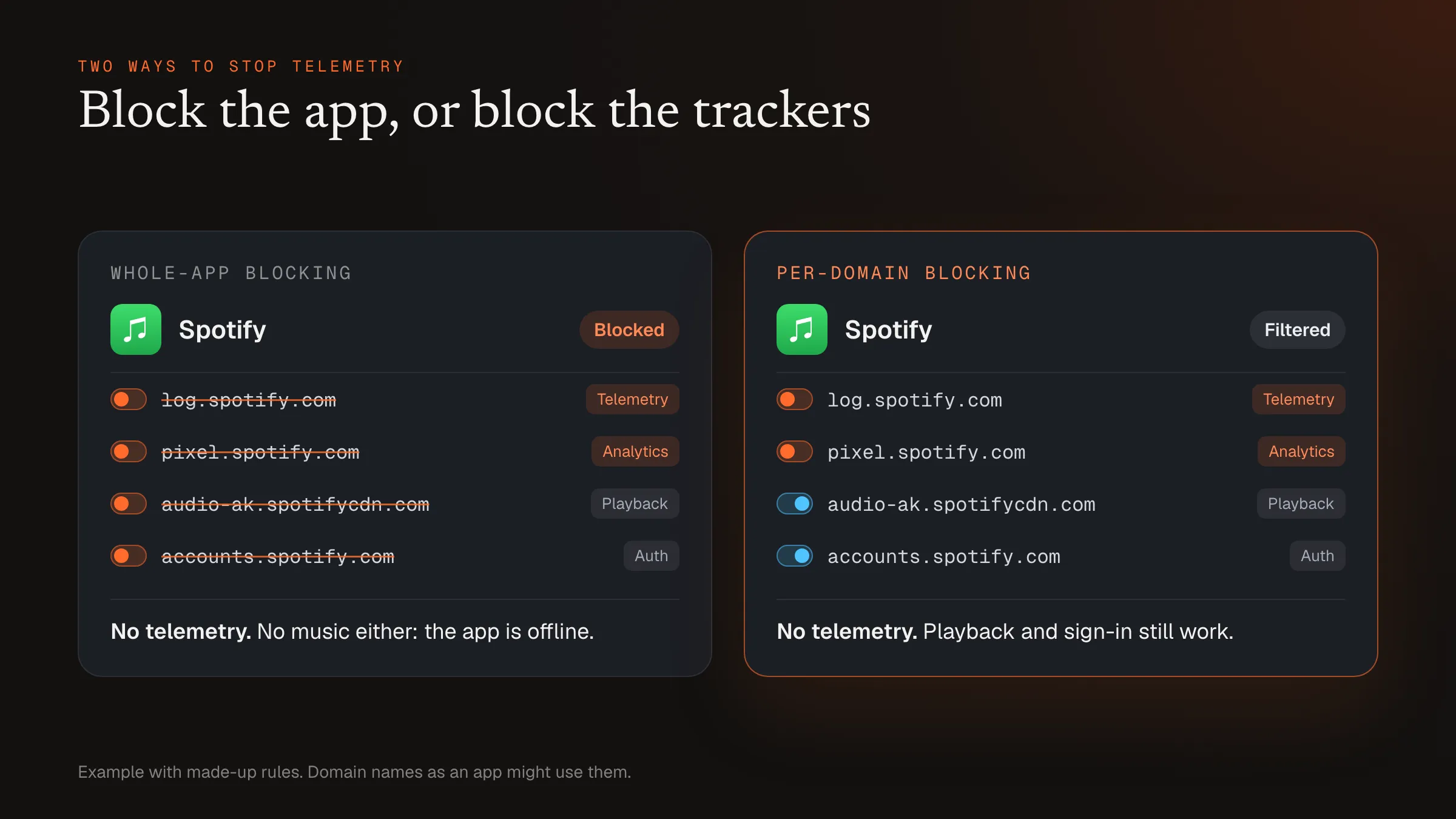 Left: what a whole-app rule does. Right: the same app, filtered domain by domain.
MacBulwark gives each app a switch with three positions:
- Blocked: nothing gets through, as in Radio Silence.
- Allowed: everything gets through.
- Filtered: some domains are blocked and the rest decided by Everything else. Block
log.andpixel.and keep playback and sign-in, or turn it round: block everything except the two domains the app really needs.
When both a domain and one of its subdomains are listed, the more specific one wins, so log.spotify.com can be blocked while spotify.com is allowed.
You don’t need to know what a domain is. Every domain in MacBulwark carries a label: Telemetry, Analytics, CDN, Auth, Sync, Account, Playback, Metadata, Update or AI. Telemetry and Analytics are orange. An app that can still reach one of them is flagged Tracker allowed, so a forgotten tracker shows up in the list on its own. The label is a best guess from the domain’s name, and you can change it.
You see what the app actually reached. The Activity tab lists every app and background process that went online in the last five minutes, busiest first, with the domains and addresses it contacted. Open a row and you see each domain with its connection count and label, and a Block or Allow button that saves straight to that app’s rule. Each change can be undone.
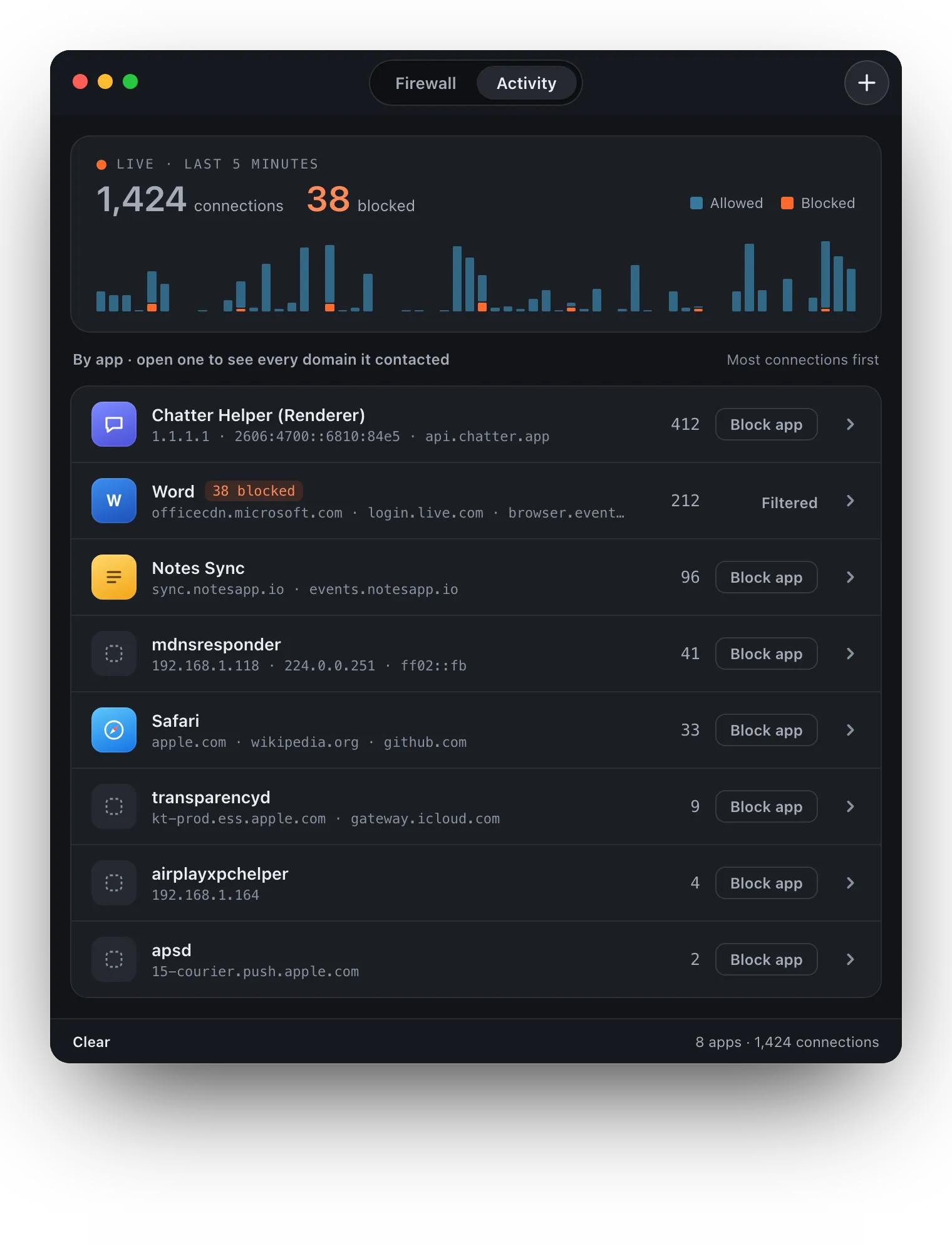 Activity: who went online, and where. Block an app or a single domain from here.
It also helps where a whole-app block can’t. Audio plug-ins run inside your DAW, so their connections look like Logic’s or Ableton Live’s. In MacBulwark you add the DAW and block only the plug-in maker’s domains; the audio plug-ins page of the manual shows how.
A longer trial. Seven days with everything working, against 24 hours. A day is short for finding out what your apps do over a normal week.
What both don’t do
Neither app asks you about new connections, by design. If you want a prompt every time an unknown app reaches out, look at LuLu or Little Snitch instead; we compare all four in Little Snitch alternatives for Mac.
MacBulwark has limits of its own worth knowing. Apps you haven’t added aren’t filtered at all. Domain rules need a server name, so a connection an app makes straight to an IP address follows the app’s Everything else setting. Activity looks back five minutes, not months. And it filters what goes out, not what comes in.
Which one?
- Get Radio Silence if you want whole apps offline and nothing else, on more than two Macs, or on a Mac older than macOS 14.
- Get MacBulwark if you want to keep using an app but stop its telemetry and analytics, see which domains it really contacts, and understand what each one is for.
Both are one-time purchases under $10, so this isn’t a big bet either way. MacBulwark’s 7-day trial lets you check what your own apps do before you pay; setup is described in the manual. To see your Mac’s connections with the tools it already has, read how to see which apps on your Mac connect to the internet.