Sugu: open your VS Code projects and git repos from the Mac menu bar
Sugu is a new menu bar launcher for VS Code workspaces and git repos, with branch and changes beside each one, and search on ⌃⌥Space. $2.99 once.
Most developers open the same twenty projects every week, and get to them a different way each time: File → Open Recent in VS Code, a Finder window three folders deep, cd and code . in Terminal, or the Project Manager extension inside the editor. Each works. None of them shows you everything in one place, before the editor is even open.
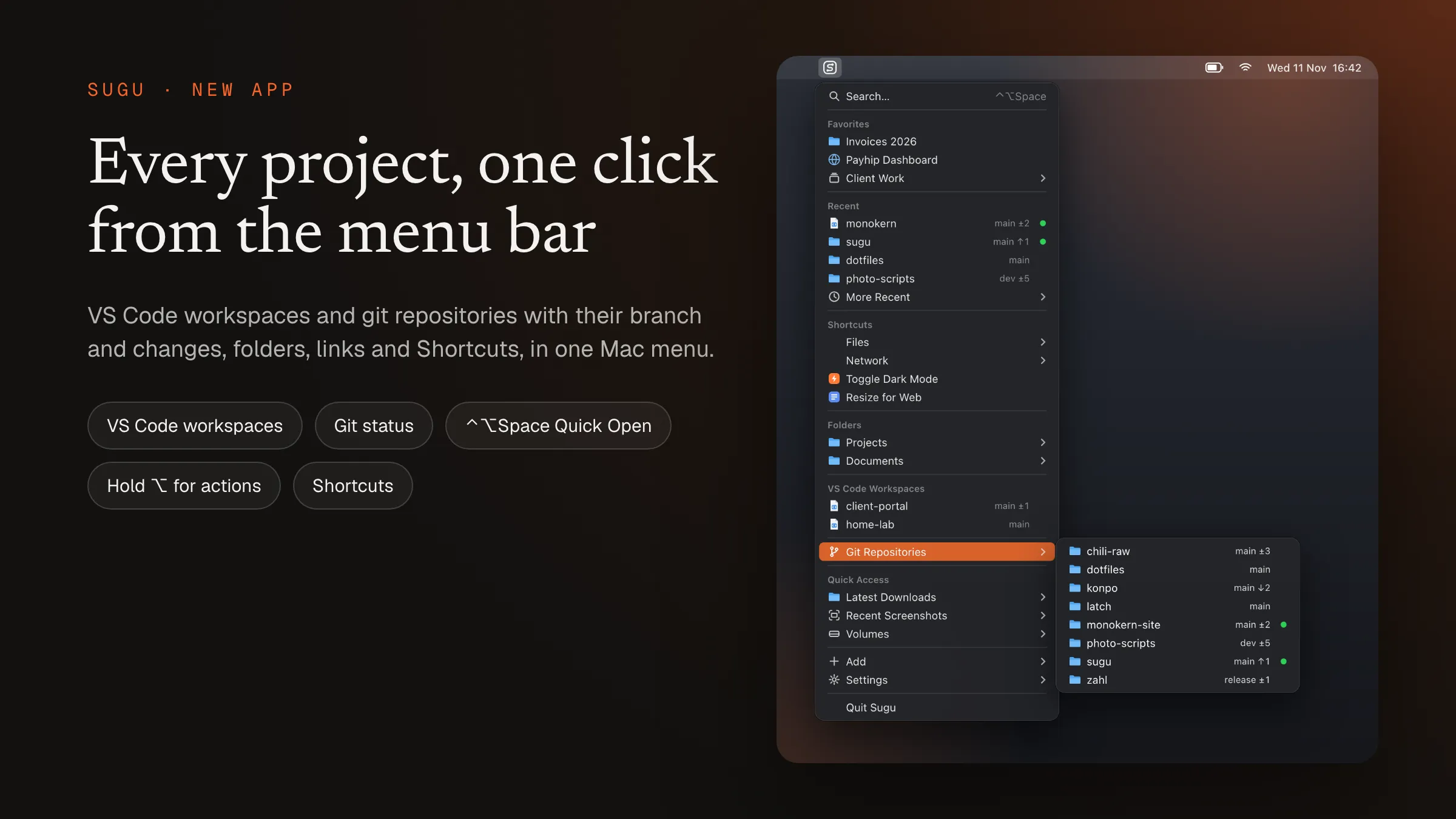
Sugu, out today, is a VS Code project manager that lives in the Mac menu bar instead. One click shows every workspace and repository you have, with each repository’s branch and uncommitted changes beside it. One more click opens it.
What Sugu finds on its own
When you first open Sugu, it asks for the folders your work lives in, such as ~/Code or ~/Projects. Then it looks three levels deep and lists:
- every git repository, with its branch, its changes and whether it is ahead or behind, as in
main ±2 ↑1; - every
.code-workspacefile; - the folders and workspaces you opened recently in VS Code, the same list as File → Open Recent;
- the folders you added, as submenus you can browse.
Folders that are always huge and never interesting, such as node_modules, build, dist, DerivedData, Pods and .venv, are skipped, so the lists stay short and fast. They refresh every time you open the menu.
Beside those, you can pin favourites (a folder, a file, a dashboard link) and group them, and Sugu keeps your latest downloads, recent screenshots and mounted volumes one submenu away. A small green dot marks projects that already have an editor window open.
⌃⌥Space: search instead of scrolling
Press ⌃⌥Space from any app and a search box opens over everything in the menu: favourites, recent projects, workspaces, repositories, the files in your added folders, and your shortcuts. Type a few letters and press ↩.
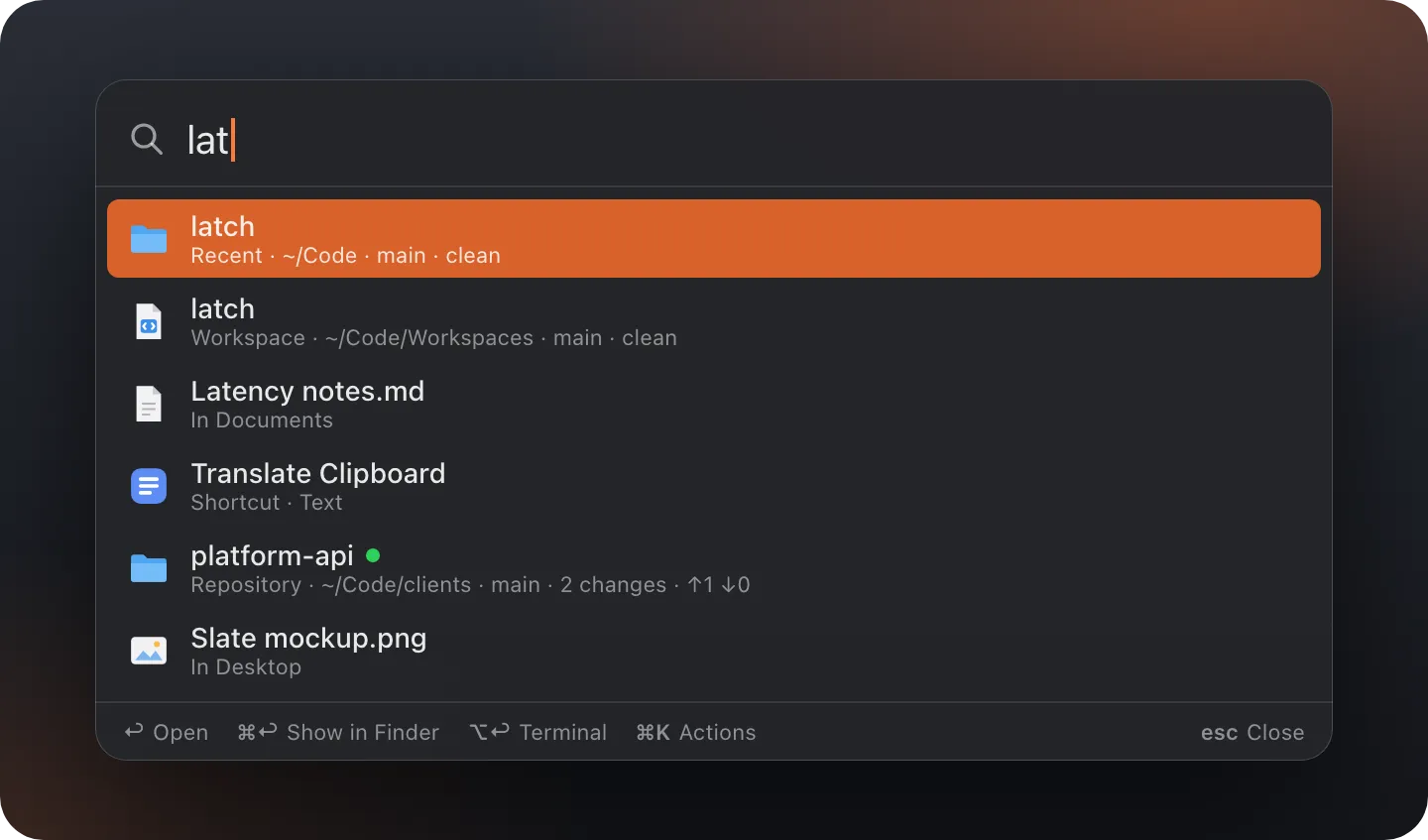 Quick Open matches the start of a name, a word inside it, or letters in order:
mks finds monokern-site.
The keys go further than opening:
| Key | What it does |
|---|---|
| ↩ | Open it, in your editor or its usual app |
| ⌘↩ | Show it in Finder |
| ⌥↩ | Open Terminal in that folder |
| ⌘K | Every action for the result |
⌃⌥M opens the whole menu right under the pointer, which helps on a big display.
Hold ⌥ for everything else
Hold ⌥ while the menu is open and every item becomes a submenu of actions: open in a new or the current editor window, Open With any other app, open Terminal there, Quick Look, copy the path, or copy the file itself to paste into Mail or a chat.
Repositories add a git section: Open on GitHub (GitLab and Bitbucket work too), Fetch, and a Pull that only fast-forwards, so it never leaves you halfway through a merge. Sugu never asks for git credentials.
Any folder can also be saved as a VS Code workspace with Save as Workspace…, which is the quickest way to turn a loose folder into something you can reopen with its own settings.
Not only VS Code
Sugu works with VS Code, VS Code Insiders, VSCodium, Cursor, Windsurf, Zed, Sublime Text, Nova and Xcode, and lists the ones you have. You choose a default editor, and a different one for a folder if you like: Xcode for your app projects, VS Code for everything else.
Your Shortcuts, without the Shortcuts app
Sugu also lists the shortcuts you made in Apple’s Shortcuts app and runs them in the background, without opening Shortcuts. Keep the app’s own folders, or make your own folders with only the five you actually use, such as Resize for Web or Toggle Dark Mode.
Why a menu bar app and not an extension?
An extension like Project Manager only works once VS Code is open, and only for VS Code. Sugu works before any editor is running, and for any of them. It also covers what an editor doesn’t: the Downloads folder, a dashboard link, the shortcut you run ten times a day. It has no window and no Dock icon. Everything, settings included, is in the menu.
It needs no permissions to start. The green “already open” dot is optional, and needs Accessibility access to read window titles.
Price and trial
Sugu needs macOS 14 or later. The first 14 days are a free trial with everything working. After that a licence is $2.99 once, with updates included and no subscription, and one key works on two Macs. Download the trial, and the Sugu manual walks through every section and setting.
If you paste between your editor, your notes and the browser all day, Pastesmith came out alongside it. And if you keep your notes as Markdown files, momo now syncs between Macs.